
The Claude Code n8n debate ran through automation Twitter for most of early 2026: which one should I use for agentic workflows? Half the answers were "Claude Code makes n8n obsolete." The other half were "n8n makes Claude Code unnecessary." Both halves were wrong. (The same crowd had the same fight about Cursor vs Claude Code six months earlier — and that one resolved the same way: it's not either/or, it's "different tools for different jobs.") After shipping production workflows on both — for client work, hsmart.dev internal tooling, and my own messy personal automations — the answer I keep landing on is the same: Claude Code is the architect, n8n is the runtime, and the interesting part is the seam between them.
This post is the three-tier architecture I actually use, the four questions I ask before picking which tool a problem belongs to, and the gotchas you only learn by burning a credit balance figuring it out.
The one-paragraph summary
If you only read this paragraph: use n8n for anything where every step is knowable in advance and the workflow runs unattended. Use the Claude Agent SDK for anything where the path through the work is decided at runtime by reasoning over a real input. Use Claude Code itself as your build-time tool — to generate the n8n workflows and write the SDK scripts in the first place. Then combine them by letting n8n call back into a small Agent SDK process at exactly the points where reasoning matters and nowhere else. That's the whole architecture; the rest of this post is the scaffolding.
Two definitions that matter, since they're easy to confuse:
- n8n is a deterministic workflow runtime. A graph of nodes, each does a known thing, executes the same way every time given the same input. It's a runtime, a UI, a state machine, and a catalog of over a thousand prebuilt integrations.
- Claude Code is a coding agent with terminal access. You give it a goal in natural language; it reads files, runs commands, writes code, fixes its own mistakes, and iterates. It's a builder, not a runtime. The "workflow" it follows is decided at every turn based on what just happened.
Since early 2026, with the n8n MCP server, Claude Code can now build n8n workflows for you — read node documentation, search the catalog, write workflow JSON, deploy it to your n8n instance, debug failures, iterate. That's the part people saw and concluded one tool ate the other. It didn't. The tools do different jobs — they just compose unusually well now.
The four questions I ask before picking
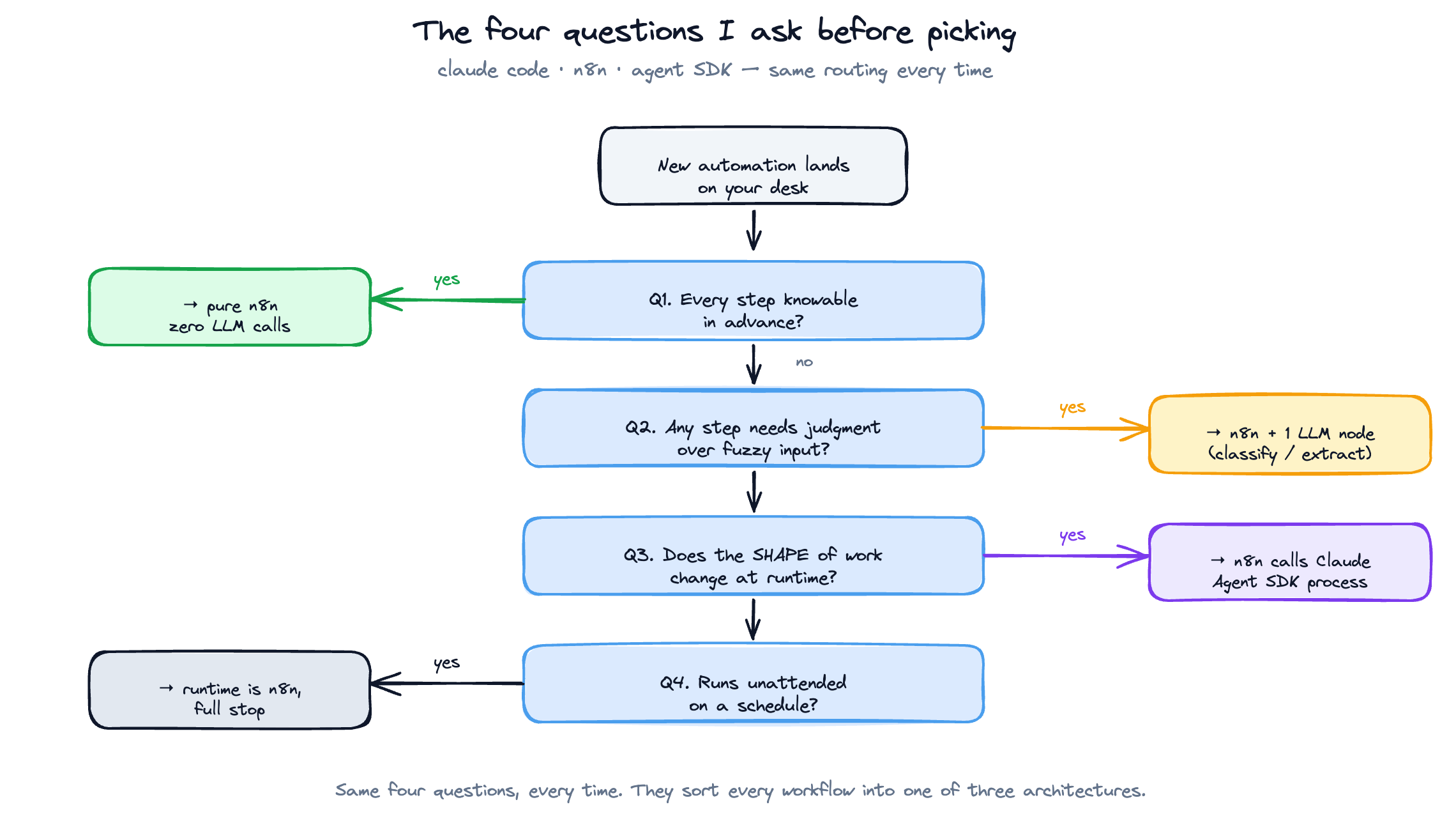
When a client problem lands on my desk, I run it through four questions in this exact order:
1. Is every step of this knowable in advance?
If yes → n8n. Not because it's better at deterministic work, but because deterministic work doesn't need a model in the loop and a model in the loop is expensive and slow compared to a node graph.
Examples that pass this test: "every Monday at 9am, pull all invoices from Stripe, format them as a CSV, drop them in Google Drive, notify Slack." That's six n8n nodes and zero LLM calls. Don't put Claude anywhere near it.
2. Does any step require judgment over fuzzy input?
If yes → there's at least one Claude call somewhere. Examples: "look at this support email and decide whether it's a refund request, a feature ask, or a complaint, and route it accordingly." That's a one-line LLM classification and you should still build the surrounding plumbing in n8n. Total architecture: 4 n8n nodes + 1 LLM node.
3. Does the shape of the work change at runtime?
If yes → the LLM might be doing more than classification. It might be deciding what tools to call next. This is the threshold where you stop using n8n's "AI Agent" node and start thinking about whether Claude Code or the Claude Agent SDK is the right primitive.
Example: "investigate this customer's recent activity, figure out why they're churning, and write a re-engagement plan." The agent doesn't know in advance whether it needs to query the DB, read support tickets, look at usage logs, or all three. You can do this inside an n8n AI Agent node with tool nodes attached, and for low-stakes work it's fine. But once the loop gets longer than ~5 turns or the agent needs to read multiple files, you've outgrown n8n's runtime and you should move that block to a Claude Agent SDK call invoked from n8n.
4. Does this workflow need to run unattended on a schedule?
If yes → the runtime is n8n, full stop. Claude Code is an interactive tool. The Claude Agent SDK is a programmatic SDK. Neither of them is a cron-with-state-and-retries-and-a-debug-UI. n8n is. Don't try to schedule Claude Code to run at 3am — wrap it in an SDK call and trigger that from n8n.
The four questions in order give you exactly one of three architectures: pure n8n, n8n with one LLM step, or n8n calling out to a Claude SDK process for the reasoning-heavy bits.
The Claude Code n8n three-tier architecture
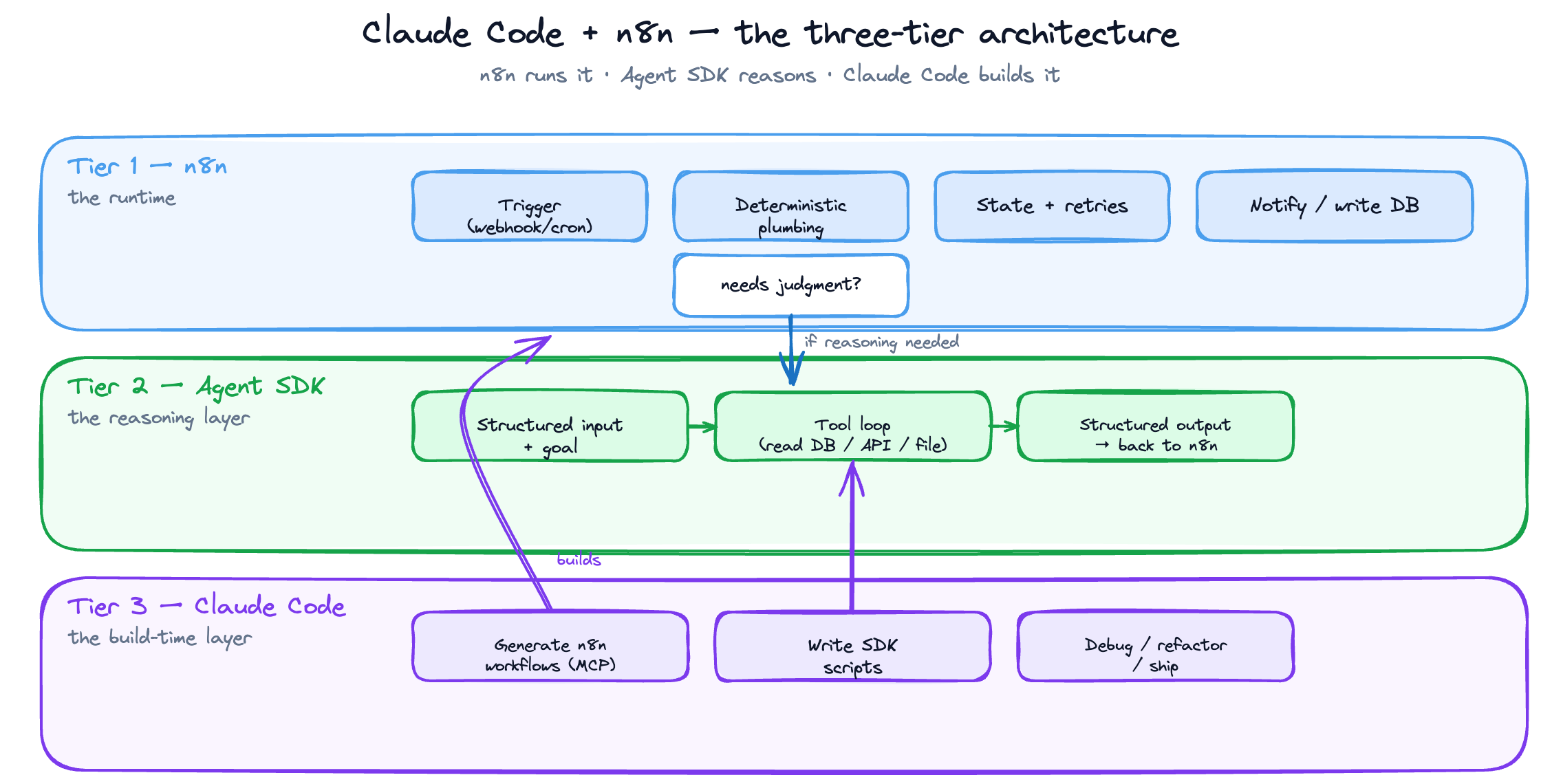
Here's the structure I now use as a default for any production agentic workflow:
Tier 1: n8n (the runtime)
  ├─ Triggers: webhook / cron / event
  ├─ Deterministic plumbing: API calls, transforms, DB writes, notifications
  ├─ State and retries: managed by n8n's execution log
  └─ When reasoning is needed → call Tier 2

Tier 2: Claude Agent SDK (the reasoning layer)
  ├─ Receives: structured input + a goal
  ├─ Uses: a small set of explicit tools (read DB, call API, write file)
  ├─ Returns: structured output back to n8n
  └─ Stateless from n8n's POV — every call is fresh

Tier 3: Claude Code (the build-time layer)
  ├─ Used by ME, not by the workflow
  ├─ Generates initial n8n workflows via the n8n MCP server
  ├─ Writes the Tier 2 SDK code
  └─ Debugs failures, refactors, ships
Read this top-down at runtime: a webhook fires, n8n picks it up, walks the graph, and at the one node where judgment is needed it calls a small Claude Agent SDK process with structured input. The SDK process does its thing, returns structured output, and n8n continues the graph with that output.
Read it bottom-up at build time: I sit in Claude Code with the n8n MCP server attached. I describe what I want. Claude Code searches the n8n node catalog, generates the workflow, deploys it to my n8n instance, runs it once, sees what broke, and fixes it. When the deterministic part is solid, I write the small reasoning SDK script in the same Claude Code session and wire it in.
The clean separation matters. If you let Claude Code be both the builder and the runtime, you end up with something that's fragile, expensive, and impossible for a non-developer client to maintain. If you let n8n be both the runtime and the reasoning layer (via its AI Agent node), you can ship faster but you'll hit a ceiling around the 5th time a long agent loop drops a tool call inside an n8n execution and you have nowhere good to debug it.
The n8n MCP server in 30 seconds
This is the piece that makes Tier 3 actually work. The n8n MCP server (open-source, n8n-mcp on GitHub, also bundled into n8n's official docs as an "advanced AI" feature) gives Claude Code three things:
- Live read access to your n8n instance — it can list workflows, inspect them, read execution logs, see what failed and why
- A searchable index of all ~1,400 nodes — Claude can ask "is there a node for X?" and get back a real answer with parameter schemas, instead of hallucinating one
- Write access to deploy workflows — Claude can construct workflow JSON and POST it to your n8n instance, then trigger an execution to test it
Setup is roughly two minutes once you have an n8n API key in hand. The exact claude mcp add invocation and the package name shift from release to release — check the n8n MCP server's own README before you copy-paste, because I've watched the flag/env-var split change between versions and there's no point in me freezing a snapshot here that goes stale next month. The shape is always the same: install the MCP server, point it at your n8n instance URL, give it an API key with read+write workflow scopes, and restart Claude Code so it picks up the new tools.
Then in Claude Code: "Build me an n8n workflow that watches a Gmail label, extracts the invoice attachment, runs it through Gemini OCR, writes the parsed line items to a Neon table, and notifies Slack." Under a minute later there's a working draft sitting in your n8n instance. You'll still need to fix two or three things (Claude tends to over-engineer the credentials block and under-engineer the error handling) but the skeleton is right, the node IDs are real, and you didn't have to drag a single thing.
This is the workflow generation step that used to take me an hour-plus of dragging nodes. It now takes about ten minutes, and most of that is me reviewing what Claude built rather than building it myself.
The four gotchas
1. Don't put Claude inside an n8n loop unless you understand the cost
n8n loops are seductive. You have a list of 200 customers, you want Claude to write a personalized email for each one, you drop a Loop node around an LLM node, and you walk away. The two failure modes you'll hit, in order of how badly they sting: first, the per-call cost is much higher than you expect because every iteration re-pays the system prompt overhead; second — and worse — the outputs end up samey, because each call has no context about the other 199 and the model defaults to its mean.
The fix: batch them. Send Claude 20 customers in a single call with structured input, ask for 20 outputs, and do ten batches instead of 200 calls. Costs drop substantially (you pay the system prompt once per batch instead of once per customer) and the outputs are actually differentiated because the model can see the variance across the batch and write against it. Run a small test before you turn it loose on the full list — the first batched call is where you'll find your prompt bugs, not in production.
2. The n8n AI Agent node is a trap past 5 turns
n8n's AI Agent node is great for short, well-bounded reasoning loops — classify this, extract that, write a one-paragraph response. The moment the agent needs to call more than 3–4 tools in sequence, things get weird: the n8n execution log is opaque about what the agent was thinking, retries don't work the way you'd expect, and partial failures leave the workflow in an unrecoverable state.
The fix: anything past 5 turns moves to a Claude Agent SDK call. n8n triggers it, waits for the structured response, and continues. Debugging happens in the SDK's own logs, not in n8n's execution view, and you can replay a single failed run locally with the exact input.
3. Claude Code workflows aren't versioned the way you think they are
When Claude Code builds you an n8n workflow via MCP, the workflow exists in your n8n instance — but the prompt that built it doesn't exist anywhere. If you regenerate the workflow next month with a slightly different prompt, you'll get a slightly different graph, and you won't be able to diff them meaningfully because n8n workflow JSON is not human-friendly to read line-by-line.
The fix: commit the generation prompt to your repo as a markdown file, alongside the exported workflow JSON. Treat the prompt as the source of truth. Treat the JSON as compiled output. Regeneration is now reproducible, and the next person who picks up the project (including future-you) can understand the intent without reverse-engineering the graph.
4. The Claude Agent SDK is not Claude Code
Easy to confuse, especially because the marketing pages overlap. Claude Code is the interactive CLI tool you use as a developer. The Claude Agent SDK is the programmatic library you use to build agents your code calls at runtime. You can't run Claude Code from inside an n8n workflow — it expects a TTY, it expects to be driven by a human, and it'll do weird things if you try to script it. You can run the Agent SDK from inside an n8n workflow, and that's the right tool for tier 2. Don't mix them up.
What I'd ship if I were starting today
A new client engagement starts with the same checklist every time:
- Map every step. If every step is knowable, I draft the n8n workflow in Claude Code via MCP and ship that. Done.
- Find the judgment steps. If there are 1–2 judgment steps with clear inputs and outputs, I add LLM nodes inline in n8n. Done.
- Find the open-ended reasoning steps. If there's a step where the model needs to decide what tools to call, I move that block to a small Claude Agent SDK script and have n8n call it as an HTTP node. Done.
- Schedule it in n8n. Always n8n. Don't schedule Claude.
- Document the prompt. Commit the generation prompt, the SDK script, and the workflow JSON to git. Treat the prompt as the source.
That's the entire system. Five steps, one architecture, applied the same way every time.
When not to use any of this
The honest counterweight: a non-trivial number of "workflows" don't need any of the above. If you're tempted to reach for the three-tier architecture, run these three checks first:
- Is this a one-off script? If you need to process a CSV once, write a 30-line Python script and delete it when you're done. Don't build an n8n workflow. Don't wire in an SDK call. The architecture above is for things that run more than once.
- Is this already solved by Zapier-and-walk-away? If your problem is "when a Typeform comes in, append a row to a Google Sheet and ping Slack," that's a Zapier zap. Three clicks, five euros a month, done. n8n is overkill, Claude Code is dramatically overkill, and you should not be reading this post for that problem.
- Does it need to exist at all? The most expensive automation is the one that automates a process the business doesn't actually do. Before you build, sit with the workflow for a week and confirm it's real, recurring, and worth more than the build cost. (For the structured version of this conversation with a real client, see the automation audit pattern I run before any build.) About a third of the "automate this" requests I get die at this step and the client thanks me for it.
If a problem clears all three checks, it's worth the three-tier treatment. If it doesn't, save yourself the architecture overhead and ship the smallest thing that works.
If you've got an n8n workflow that's either too dumb or too expensive right now, send me the screenshot and a one-line description of what it's supposed to do. I'll tell you which of the three tiers each step belongs in, which step is bleeding the budget, and what you'd build if you started over today. 30-minute call, free, no pitch — you leave with a labelled diagram and a clear next step, whether you hire me to build it or not.
Related reading


Frequently asked questions
No. They solve different problems. Claude Code is an interactive build-time tool — you use it to write code and generate workflows. n8n is an unattended runtime — it runs those workflows on a schedule with retries, state, and a debug UI. The right setup is "Claude Code builds it, n8n runs it."
An open-source MCP (Model Context Protocol) server that gives Claude Code live read/write access to your n8n instance. It exposes the full node catalog, lets Claude inspect existing workflows and execution logs, and lets Claude deploy new workflow JSON directly. Setup takes about two minutes.
No, and you shouldn't try. Claude Code expects a TTY and a human. If you need scheduled reasoning, write a small [Claude Agent SDK](https://docs.claude.com/en/api/agent-sdk/overview) script and trigger it from an n8n cron node.
Use n8n's AI Agent node for short, well-bounded reasoning loops (under 5 turns, 3–4 tools max). Move to a Claude Agent SDK call any time the agent needs longer loops, more tools, or proper debugging — you'll get structured logs, replayable runs, and a sane error surface.
For most production use cases, yes — but only as the *runtime layer*, not the reasoning layer. Use n8n for triggers, deterministic plumbing, retries and state. Push the actual reasoning into a Claude Agent SDK process called from n8n. That separation is what makes the system maintainable.