

The message I sent was simple: "Are you open this evening?" What came back was spot on — the correct hours, friendly tone, exactly what a well-briefed staff member would say. I had started building two hours earlier.
That's the promise of an n8n WhatsApp chatbot: a business that replies instantly, 24/7, without anyone sitting at a phone. And it's more achievable than most people think.
But before you get excited: two hours gets you a proof of concept. Not a product. In this post I'll walk you through exactly how I built it, the gotchas that trip everyone up, and what the real gap looks like between "it works" and "it's ready for your customers."
Why Businesses Are Looking at WhatsApp Chatbots Right Now
WhatsApp has over 2 billion active users. In Spain, most of Latin America, and large parts of Europe and Africa, it's the default way people communicate — including with businesses. Customers don't email. They don't fill out contact forms. They send a WhatsApp.
And for most small businesses, that's a problem. Someone has to be there to reply. If they're busy, replies are late. If it's after hours, no reply at all. And in 2026, "I'll get back to you tomorrow" is often enough for a customer to move on to whoever responded first.
The obvious solution is automation. And yes, there are plenty of tools that offer exactly this: ManyChat, Tidio, Respond.io, Trengo — slick platforms with nice dashboards. The catch? €100 to €300+ per month, depending on the plan. For a small restaurant or independent clinic, that adds up fast, often for features they'll never use.
The alternative — building on top of Meta's official API — is intimidating on paper. In practice, it took me two hours.
The Stack (And Why n8n)
Here's what I used:
- Meta WhatsApp Business Cloud API — the official, free-to-get-started way to connect a WhatsApp number to a custom backend
- n8n — self-hosted workflow automation that handles the webhook logic, message routing, and API calls
- Google Gemini Flash — fast, cheap, and more than capable of handling FAQ-style conversations
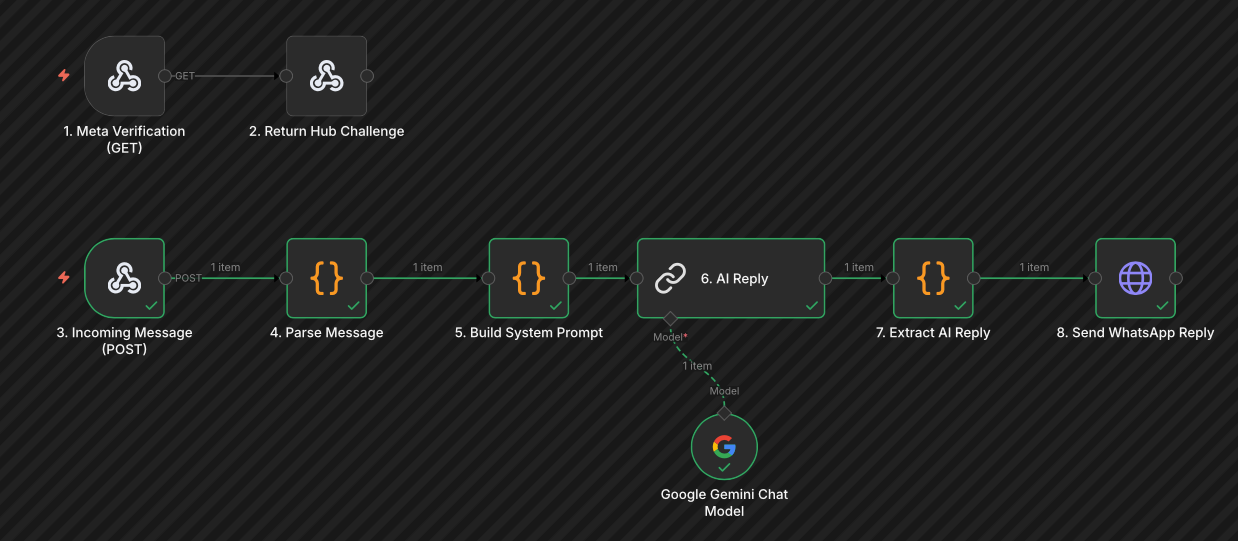
I chose n8n over Make or Zapier because I self-host it — no per-operation pricing, no data leaving my infrastructure, and full flexibility to add custom logic as the project grows.
The flow looks like this: a customer sends a WhatsApp message → Meta fires a webhook to n8n → n8n passes the message to Gemini with a system prompt → Gemini replies → n8n sends the reply back through the Meta API → the customer receives a response. Round trip: a few seconds.

The One Thing Every Tutorial Gets Wrong
This is the part I'd save you hours on.
Most guides tell you to set up authentication using Basic Auth. Don't. The WhatsApp Cloud API uses Bearer token authentication via an HTTP header. In n8n, that means using Header Auth as the credential type, configured like this:
Credential type: Header Auth
Name:  Authorization
Value: Bearer YOUR_ACCESS_TOKEN
The second gotcha: when a message arrives via webhook, the phone number ID you need to send the reply isn't at the top level of the payload. It's nested inside:
value.metadata.phone_number_id
Your n8n flow needs to extract it from there and pass it into the send-message API call. Miss it and your replies go nowhere.
These two details are wrong or missing in most tutorials. With them, the setup is straightforward. Without them, you're debugging in circles.
What Goes Into the System Prompt
The system prompt is what makes the bot actually useful — and it's simpler than most people expect.
A good one includes: the business name and what it does, opening hours and location, the main services or pricing, what to do when the bot doesn't know something (e.g., "Let me flag this for the team and they'll follow up with you shortly"), and the tone to use. That's it. With that context loaded, the AI handles 80% of incoming messages without any extra logic. No training, no datasets — just a well-written prompt.
What Two Hours Actually Gets You
Let me be direct about this, because I think it matters.
After two hours, here's what was working:
- A WhatsApp number connected to the Meta Cloud API
- A webhook in n8n receiving incoming messages
- Gemini responding in context based on a system prompt
- The reply delivered back to the user's WhatsApp, in seconds
Here's what it didn't have:
- Conversation memory — every message was treated as a fresh conversation, no context carried between them
- A frontend — no dashboard, no way for the business owner to see conversations or step in manually
- Error handling — if an API call failed, nothing caught it
- Integrations — no reservation platform, no CRM, no calendar sync
- Production hardening — no rate limiting, no message deduplication, no logging
For a demo, it's impressive. For a real business running on it with real customers, it would break. That's not a failure — it's the honest difference between a proof of concept and a product. The MVP took two hours. The product takes weeks.
One Gotcha Business Owners Need to Know
Before you switch any existing WhatsApp number to the Cloud API: once it's connected, you lose access to the WhatsApp Business app on that phone. You can no longer read or send messages from the mobile app — everything goes through the API.
For some businesses this is a dealbreaker. For others it's completely fine, because the whole point is to automate the responses anyway. Either way, know this before you make the switch — not after.
The Real Cost Breakdown
Here's why the economics of building this yourself are hard to ignore.
| SaaS Solution | Custom Build | |
|---|---|---|
| Monthly cost | €100–300+ | €5–20 |
| Setup time | Minutes | Days–weeks |
| Customisation | Limited | Full |
| Data ownership | Theirs | Yours |
| Integrations | Their catalogue | Anything |
Meta's API pricing is per-conversation, and for most small businesses it amounts to a few euros a month. n8n, self-hosted, is essentially free. Gemini Flash costs fractions of a cent per message.
What you're paying for with the SaaS platforms is convenience and speed to launch. That's a legitimate trade-off — especially if you need something running today and have no one technical to set it up. But for a business willing to invest in a proper custom setup once, the ongoing savings are real, and you own the whole system.
Is This Right for Your Business?
This approach makes sense if:
- You're already on WhatsApp Business and customers know your number
- You get the same questions repeatedly — opening hours, pricing, availability — the kind of thing a well-written system prompt handles without effort
- You want to own your data, not have it sitting in a third-party platform you pay monthly to access
- You're in it for the long game — higher upfront investment, dramatically lower ongoing cost
It's not the right call if you need something live tomorrow and have no technical resource to manage it. In that case, a SaaS solution saves you time — and time has real value too.
From Demo to Production: The Real Gap
The two-hour proof of concept is real. You can go from zero to a functioning WhatsApp AI chatbot in an afternoon if you know where to look and dodge the traps.
But the gap between "it works on my test number" and "it's running reliably for hundreds of customers a day" is where the actual work lives. Conversation memory so the AI remembers what was said three messages ago. A dashboard so the business owner can read threads and jump in when needed. Integrations with the reservation system or CRM. Error handling that doesn't let a failed API call silently disappear. That's the product.
If you're a business owner thinking "I want this, but I don't want to build it myself" — get in touch at hsmart.dev. I'll scope it out and tell you honestly whether it makes sense for your setup.