

The Next.js i18n SEO problem is rarely what developers think it is. It's not missing meta tags or a broken sitemap. It's a site that speaks one language while pretending to speak four — and Google, reasonably, takes it at its word.
My agency site was getting 2 clicks and 190 impressions over 28 days in Search Console. I'm an AI automation consultant in Spain, targeting Spanish and European clients — every click came from Germany. Zero Spanish queries. Zero French queries. Fully invisible to the market I was supposedly building for.
The site wasn't technically broken. It had proper meta tags, JSON-LD structured data, a sitemap, fast load times. But every page had <html lang="en">, one set of translations, one URL structure. Google saw one audience. I was building for four.
By end of day April 23, that was fixed: 4 locales (EN/ES/DE/FR), 308-redirect middleware, dynamic <html lang> per route, 52-URL sitemap with hreflang, and two performance wins I didn't plan for. Fourteen commits, one session. This is that build log.
What was actually broken (the GSC diagnosis)
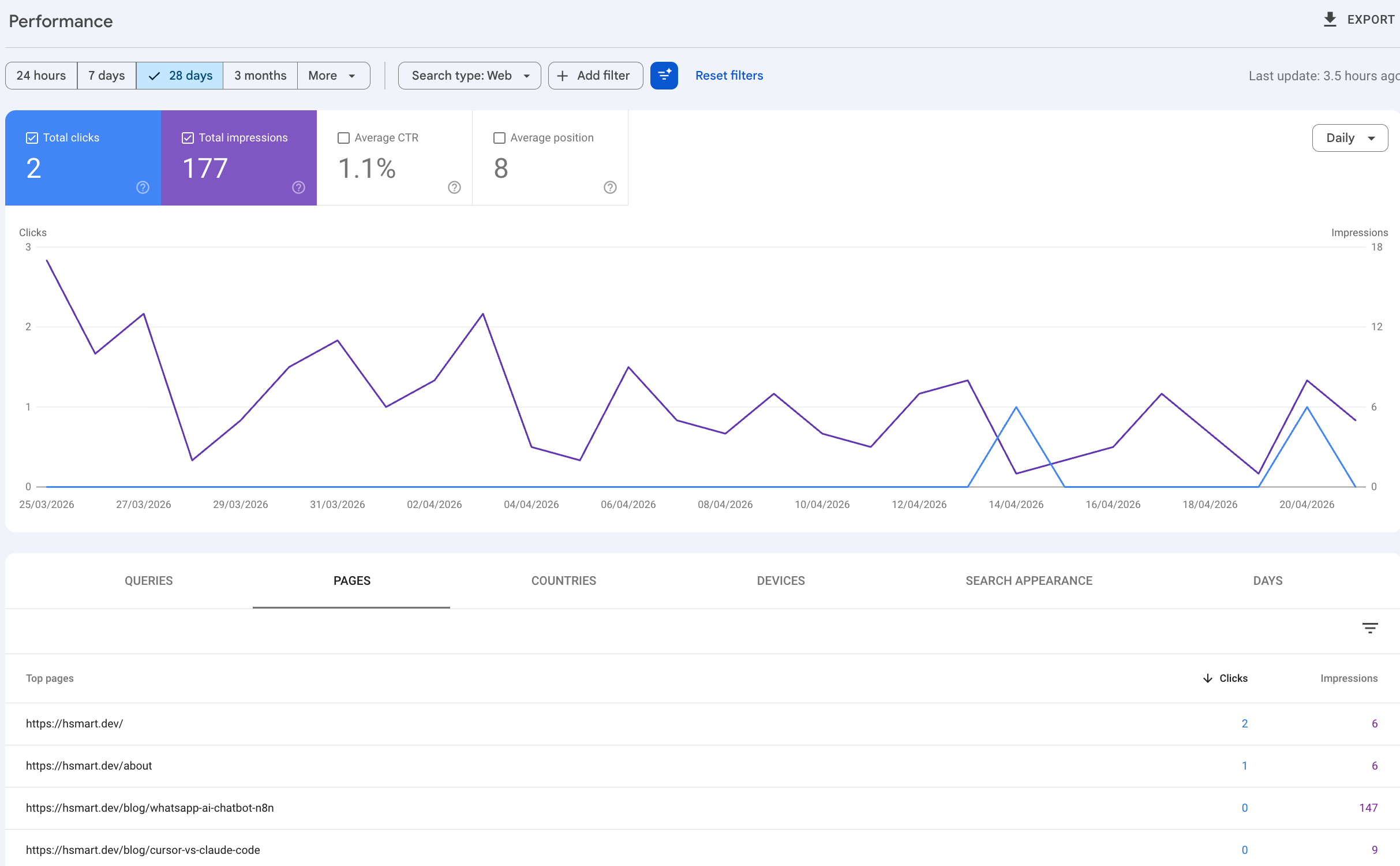
A quick look at Search Console told the story clearly:
- Top opportunity:
/blog/whatsapp-ai-chatbot-n8nat position 7.63 — 150 impressions, 0 clicks. Sitting on page 1 of Google in some markets, invisible in others. - Primary country for all traffic: DE (Germany). Why? The site had good content in English, and German speakers index English content. Spanish speakers often don't.
<html lang="en">on every page, regardless of whether translations existed. Google treated every page as English content for English speakers.- A 13-URL sitemap. One entry per page, no locale variants.
The technical SEO wasn't the problem — the structure was. The site spoke one language and Google believed it.
App Router i18n SEO Setup (Without next-intl)
I was already using i18next + react-i18next for client-side translations, with JSON files for each locale. The missing piece was URL structure and server-side rendering. I didn't want to bring in next-intl mid-project and refactor every page — I wanted to add the routing layer and make the translations SSR-correct without rewriting the internals.
next-intl is a solid library and the right call for greenfield projects. It handles nested namespaces, type-safe translations, and async loading out of the box. But if you're already past the point of no return with your own i18n setup, the primitives below get you to the same place.
The plan:
- Move all pages under
app/[lang]/(so URLs become/es/about,/de/services, etc.) - Add middleware to detect locale and 308-redirect unprefixed paths
- Make translations work synchronously on the server so
<html lang>is correct at render time - Generate a proper sitemap with hreflang alternates
14 commits, one session.
The [lang] routing pattern
The core change in Next.js App Router i18n is moving everything under a dynamic segment. The Next.js internationalization guide covers the general approach — what follows are the specific decisions and gotchas I hit implementing it for a real production site:
app/
  [lang]/
    layout.tsx        ← only root layout. Contains <html lang={params.lang}>
    page.tsx          ← homepage
    about/page.tsx
    services/page.tsx
    ...
Critical: delete app/layout.tsx. There should be exactly one root layout, and it's app/[lang]/layout.tsx. This is the one that sets <html lang={params.lang}> — the thing Google actually reads to determine page language.
API routes, sitemap.ts, feed.xml/route.ts, robots.ts live outside [lang]/ and don't need it — they return Response objects, not rendered pages, so no layout applies.
Multilingual SEO Middleware: Locale Detection Without the Loops
The middleware sits at project root and intercepts every request before it hits a route:
// middleware.ts
import { NextResponse } from 'next/server'
import type { NextRequest } from 'next/server'
import { SUPPORTED_LOCALES, DEFAULT_LOCALE } from '@/lib/locales'

export function middleware(request: NextRequest) {
  const { pathname } = request.nextUrl

  // Skip: already has a locale prefix
  if (SUPPORTED_LOCALES.some(locale => pathname.startsWith(`/${locale}/`) || pathname === `/${locale}`)) {
    return NextResponse.next()
  }

  // Detect from cookie first, then Accept-Language header, then fallback
  const cookieLocale = request.cookies.get('NEXT_LOCALE')?.value
  const acceptLanguage = request.headers.get('accept-language')?.split(',')[0]?.split('-')[0]

  const detected = (
    (cookieLocale && SUPPORTED_LOCALES.includes(cookieLocale) ? cookieLocale : null) ||
    (acceptLanguage && SUPPORTED_LOCALES.includes(acceptLanguage) ? acceptLanguage : null) ||
    DEFAULT_LOCALE
  )

  const url = request.nextUrl.clone()
  url.pathname = `/${detected}${pathname}`
  return NextResponse.redirect(url, 308)
}

export const config = {
  matcher: ['/((?!api|_next/static|_next/image|feed.xml|sitemap.xml|robots.txt|favicon.ico|llms.txt).*)'],
}
The matcher is the part that bites people. Miss a path in the exclusion list and you'll have contact forms redirecting to /es/api/contact, sitemap.xml getting prefixed, or RSS feeds returning 404s. Add anything you know is outside your page tree. If you're running a WhatsApp webhook or any external callback URL through the same Next.js app (like in my WhatsApp AI chatbot build), make sure those API paths are excluded or you'll have middleware intercepting your webhook payloads.
The 308 (Permanent Redirect) matters for SEO — it passes link equity to the canonical localized URL. A 302 does not.
The SSR translation trap (and how to fix it)
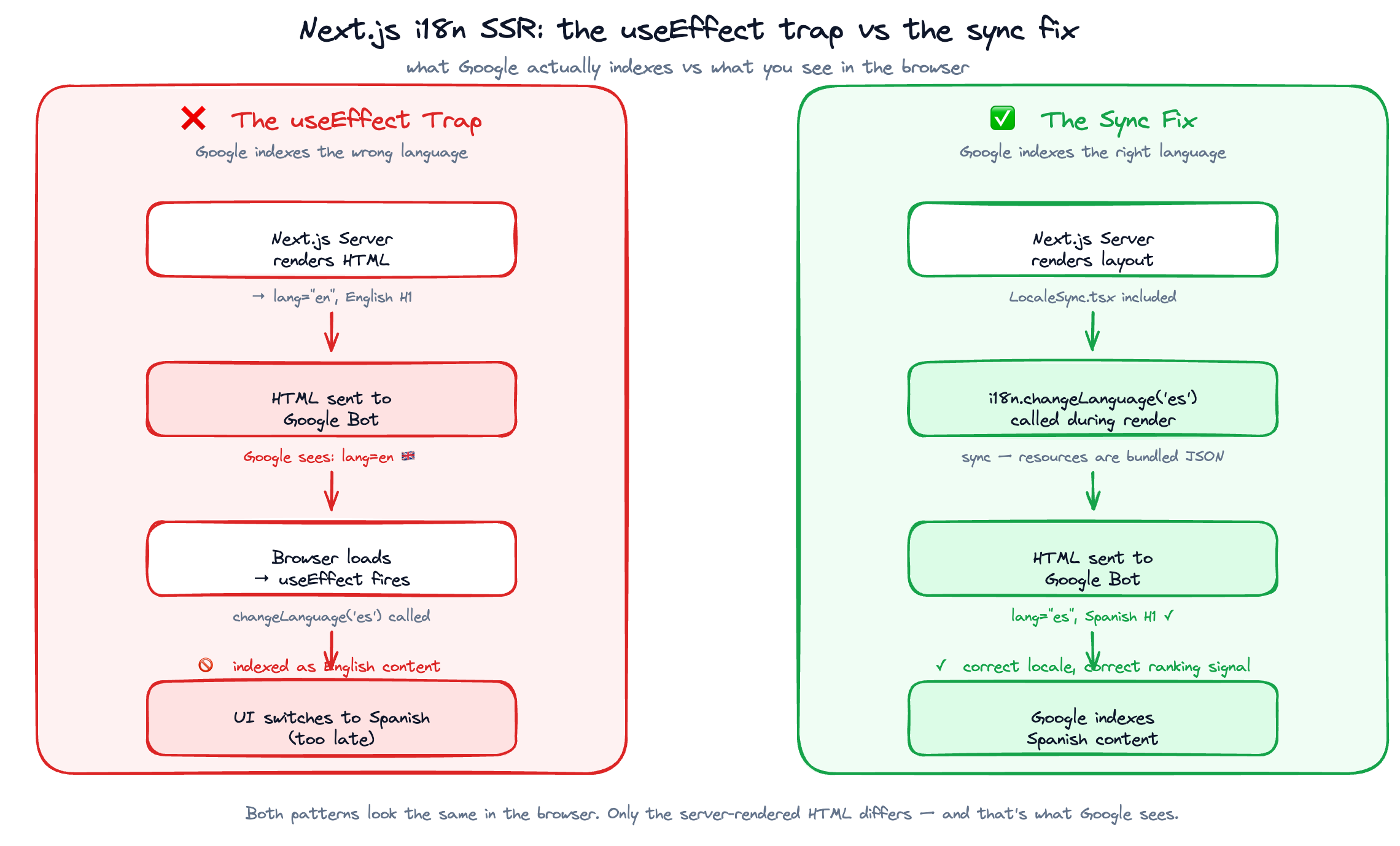
This is the part that isn't obvious. You can add [lang] routing and middleware and still end up serving <html lang="en"> on your Spanish pages — because translations update via useEffect, which runs after the server renders the HTML.
The pattern that fails:
// ❌ Wrong: runs after SSR, Google sees the English HTML
useEffect(() => {
  i18n.changeLanguage(lang)
}, [lang])
Google crawls the initial HTML. If that HTML still has English content because changeLanguage ran on the client, you've done all this work for nothing.
The fix is calling changeLanguage synchronously during render, before the component tree renders:
// ✅ Correct: runs during render, SSR HTML is correct
// LocaleSync.tsx — called inside [lang]/layout.tsx
'use client'

import i18n from '@/lib/i18n'

export default function LocaleSync({ lang }: { lang: string }) {
  // Synchronous because resources are bundled JSON — no async loading
  if (i18n.language !== lang) {
    i18n.changeLanguage(lang)
  }
  return null
}
This works because the translation resources are bundled JSON (imported at init time), so changeLanguage resolves synchronously — no async, no setState loop. The rendered HTML that Google indexes now has the correct language.
Important caveat: this pattern only works if your translation resources are loaded synchronously — i.e., bundled JSON imported at module init time. If you're fetching translations from an API or using i18next-http-backend, changeLanguage is async and this approach breaks silently. In that case you need to load translations in a server component and pass the resolved strings down as props, or use a library like next-intl which handles this properly.
After this fix: navigating to /es/about gives you <html lang="es"> and Spanish H1 text in the source. /de/about gives <html lang="de"> and German content. That's what you're after.
Sitemap: from 13 URLs to 52 with hreflang
The hreflang specification requires every locale variant of a page to reference all the other variants, including an x-default. In a sitemap, this looks like:
<url>
  <loc>https://hsmart.dev/es/about</loc>
  <xhtml:link rel="alternate" hreflang="es" href="https://hsmart.dev/es/about"/>
  <xhtml:link rel="alternate" hreflang="en" href="https://hsmart.dev/en/about"/>
  <xhtml:link rel="alternate" hreflang="de" href="https://hsmart.dev/de/about"/>
  <xhtml:link rel="alternate" hreflang="fr" href="https://hsmart.dev/fr/about"/>
  <xhtml:link rel="alternate" hreflang="x-default" href="https://hsmart.dev/es/about"/>
</url>
The x-default annotation tells Google which version to serve to users in languages or regions you haven't specifically targeted. I'm pointing it to /es because that's the default locale and the primary market.
In app/sitemap.ts:
const PAGES = ['', 'about', 'services', 'portfolio', 'contact', 'blog']

export default function sitemap(): MetadataRoute.Sitemap {
  const entries: MetadataRoute.Sitemap = []

  for (const page of PAGES) {
    for (const lang of SUPPORTED_LOCALES) {
      const url = `${BASE_URL}/${lang}${page ? `/${page}` : ''}`
      entries.push({
        url,
        lastModified: new Date('2026-04-23'), // use a static date or your actual page mod time — new Date() tells Google every page changed today, which wastes crawl budget
        alternates: {
          languages: {
            ...Object.fromEntries(SUPPORTED_LOCALES.map(l => [l, `${BASE_URL}/${l}${page ? `/${page}` : ''}`])),
            'x-default': `${BASE_URL}/${DEFAULT_LOCALE}${page ? `/${page}` : ''}`,
          },
        },
      })
    }
  }

  return entries
}
Result: 13 URLs became 52. Sitemap resubmitted to GSC. Now Google has a map of every locale variant and the relationships between them.
One more thing worth adding alongside the sitemap: self-referential canonical tags. Each locale page should declare itself as its own canonical — <link rel="canonical" href="https://hsmart.dev/es/about"> on the Spanish about page, /en/about on the English one, and so on. Without this, Google may pick an arbitrary canonical across your 4 variants. In Next.js App Router, this goes in the metadata export of each page or in your shared buildLocalizedMetadata() helper.
The performance surprise: react-icons/si
While I had PageSpeed Insights open running baseline measurements, I noticed /services had a mobile performance score of 62 and a Speed Index of 15.5 seconds. That's a broken experience, not a slow one.
The culprit: a tech stack marquee importing 27 icons from react-icons/si. The si (Simple Icons) set is 9.9 MB unminified. Even with tree-shaking, bundling 27 of them into an SSR'd component added 24.7 kB to the critical bundle.
Fix: extract the marquee into its own component, dynamic-import it with ssr: false, and gate the fetch behind an IntersectionObserver — so it only loads when the user scrolls near it:
// views/Services.tsx
const LazyTechStack = dynamic(() => import('@/components/TechStackMarquee'), {
  ssr: false,
  loading: () => <div className="h-16" />,
})

// Inside the component:
<LazyTechStack threshold={0.1} />
I do not have the before, but the after is for sure impressive:
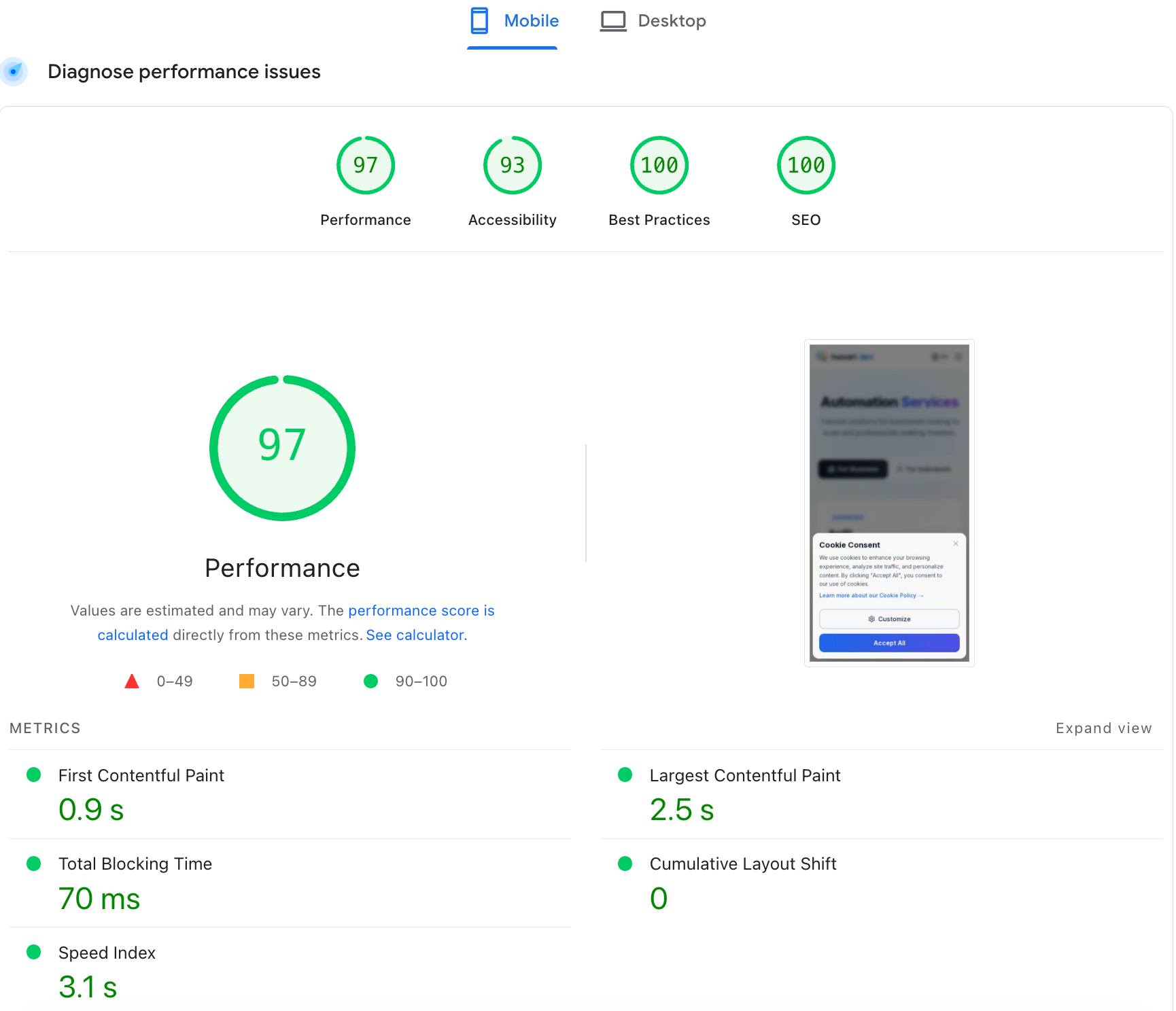
Results:
| Metric | Before | After |
|---|---|---|
| Mobile performance score | 62 | 96 |
| Speed Index | 15.5s | ~3.1s |
Critical bundle /services | 24.7 kB | 4.72 kB |
Lighthouse never fetches the icon chunk because the IntersectionObserver threshold isn't triggered during a cold audit — the marquee is below the fold.
If you're importing from react-icons/si (or any icon set heavy enough to matter) directly in an SSR'd component, this is your problem. The fix is the same: dynamic() with ssr: false, behind an IntersectionObserver gate. The same pattern applies to animation libraries, charts, and any component that's decorative enough to skip during a first contentful paint. See how I think about this kind of architectural decision in my post on combining Claude Code and n8n for client projects.
What to expect after a URL structure change
Moving pages from /about to /es/about is a URL structure change, and Google treats it as such. A few things to know:
- 308 redirects preserve link equity — the old URL redirects permanently, and Google transfers the ranking signals to the new canonical. This is why 308 matters over 302.
- Expect a 2-4 week ranking wobble — while Google reprocesses the URL change, you may see temporary ranking dips on pages that were previously ranking. This is normal and recovers.
- GSC takes 24-48h to pick up the new sitemap — after resubmission, give it a couple of days before you start checking indexed URL counts.
- The payoff is not immediate — Spanish and German organic traffic won't appear in week one. The signals take time to process. What you're building is infrastructure for the next 6-12 months, not next week's traffic.
I'm tracking this in GSC. I'll write a follow-up once there's data worth sharing — probably in 6-8 weeks.
If you're building for clients who need their sites found in more than one language, the architecture above is what I use. It's not glamorous — middleware and URL segments aren't the exciting part of AI automation consulting — but invisible infrastructure is the work that makes the visible stuff matter.
If your agency site or client site is English-only and most of your clients aren't — this is the fix. Get in touch if you want help scoping a multilingual SEO rebuild or reviewing an existing implementation. I do technical reviews and builds through hsmart.dev as part of my AI automation consulting work.
Related reading



Frequently asked questions
No. `next-intl` is a solid library and the right choice for many projects, especially if you're starting fresh. But if you already have an i18n setup (i18next, react-i18next, custom JSON files), you can add App Router locale routing and hreflang without migrating to next-intl. The key pieces — `[lang]` dynamic segment, middleware, sitemap — are framework primitives, not library requirements.
`x-default` is a special hreflang annotation that tells Google which page to serve to users whose language or region you haven't specifically targeted. It's optional but recommended. Point it at your default locale or a language-selector page. [Google's documentation](https://developers.google.com/search/docs/specialty/international/localized-versions) covers when it applies.
Short-term, yes — a 2-4 week wobble is normal for URL structure changes. 308 redirects preserve link equity, so the long-term ranking should recover at the new canonical URLs. If you had any pages ranking, expect a temporary dip, not a permanent one.
Google crawls the initial server-rendered HTML. If your `i18n.changeLanguage()` call happens in `useEffect`, it runs after SSR and the initial HTML will be in your default language regardless of the URL. Call `changeLanguage` synchronously during render, before the component tree renders — this only works reliably if your translation resources are bundled JSON (synchronous resolution). If you're loading translations from an API, you need a different approach (load in the server component, pass as props).
In Google Search Console: go to Sitemaps → enter the sitemap URL → Submit. If you have a [sitemap resubmit script](https://developers.google.com/webmaster-tools/v1/sitemaps/submit), you can do it programmatically using the Search Console API with write scope. Either way, resubmission doesn't guarantee immediate re-crawl — it queues the sitemap for Google's crawl schedule.