
Si solo pudiera automatizar una cosa en el negocio de un freelance o consultor, sería la facturación. No porque sea lo más interesante. Es la fuga más cara escondida a plena vista. Automatizar la facturación es el sistema que construyo primero para casi todos mis clientes, y también fue el primero que construí para mi propio negocio, porque el retorno no admite discusión: dejas de olvidarte de enviar facturas, dejas de perseguir pagos atrasados y recuperas las 2-4 horas al mes que se te iban en una hoja de cálculo.
Este artículo es el sistema exacto, en el orden en que yo lo montaría.
Por qué la facturación es la fuga que conviene arreglar primero
La facturación manual falla de tres maneras silenciosas y costosas:
- La factura que olvidaste enviar. La más común y la más cara. Terminas un proyecto, pasas al siguiente, y tres semanas después te das cuenta de que nunca cobraste el anterior. Eso no es dinero que llega tarde. Durante un tiempo es dinero que no existe, y reclamarlo a toro pasado resulta lo bastante incómodo como para que algunos autónomos simplemente… no lo hagan.
- La factura impagada que nadie reclamó. Salió, el cliente se olvidó, y a ti no te apetecía enviar el email de «oye, ¿viste mi factura?». Así que ahí se queda.
- Las horas perdidas en la mecánica. Copiar la factura del mes pasado, cambiar la fecha y el número, arreglar el formato, adjuntar el PDF, redactar el email, registrarla para impuestos. Por factura son solo unos minutos. A lo largo de un año de clientes es una o dos jornadas de trabajo que no vas a recuperar.
Ninguno de estos es un problema de habilidad. Son problemas de sistema, lo que significa que son automatizables. Es la primera fuga que tapo en coaches y consultores independientes precisamente porque el ROI es el más claro de todo el negocio: dinero que estabas perdiendo, más horas, más la dignidad de no volver a perseguir a un cliente nunca más.
El sistema, en orden de construcción
No necesitas una plataforma de facturación de gran empresa. Necesitas cuatro capacidades, construidas en este orden.
1. Facturas recurrentes que se envían solas
Si alguna parte de tus ingresos es recurrente (una iguala, un contrato mensual de soporte, una suscripción) esta es la pieza con mayor ROI de todas. La factura de un contrato mensual fijo debería generarse y enviarse sola el mismo día de cada mes, sin que tú intervengas para nada.
La versión más limpia: una herramienta de facturación o un pequeño flujo de automatización que, según un calendario, crea la factura a partir de una plantilla, le asigna el siguiente número de tu serie legal, genera el PDF y se la envía por email al cliente, y la registra para tu gestor. Se configura una vez; funciona para siempre. Para los contratos recurrentes, esto por sí solo elimina por completo el fallo de «se me olvidó facturar».
Una trampa que aprendí por las malas construyendo el mío: ancla el envío programado a una hora fija del día (medianoche), no a la hora a la que se creó la regla. Si no, una regla configurada a las 4 de la tarde puede saltarse en silencio su primer ciclo. Detalle pequeño, factura perdida real.
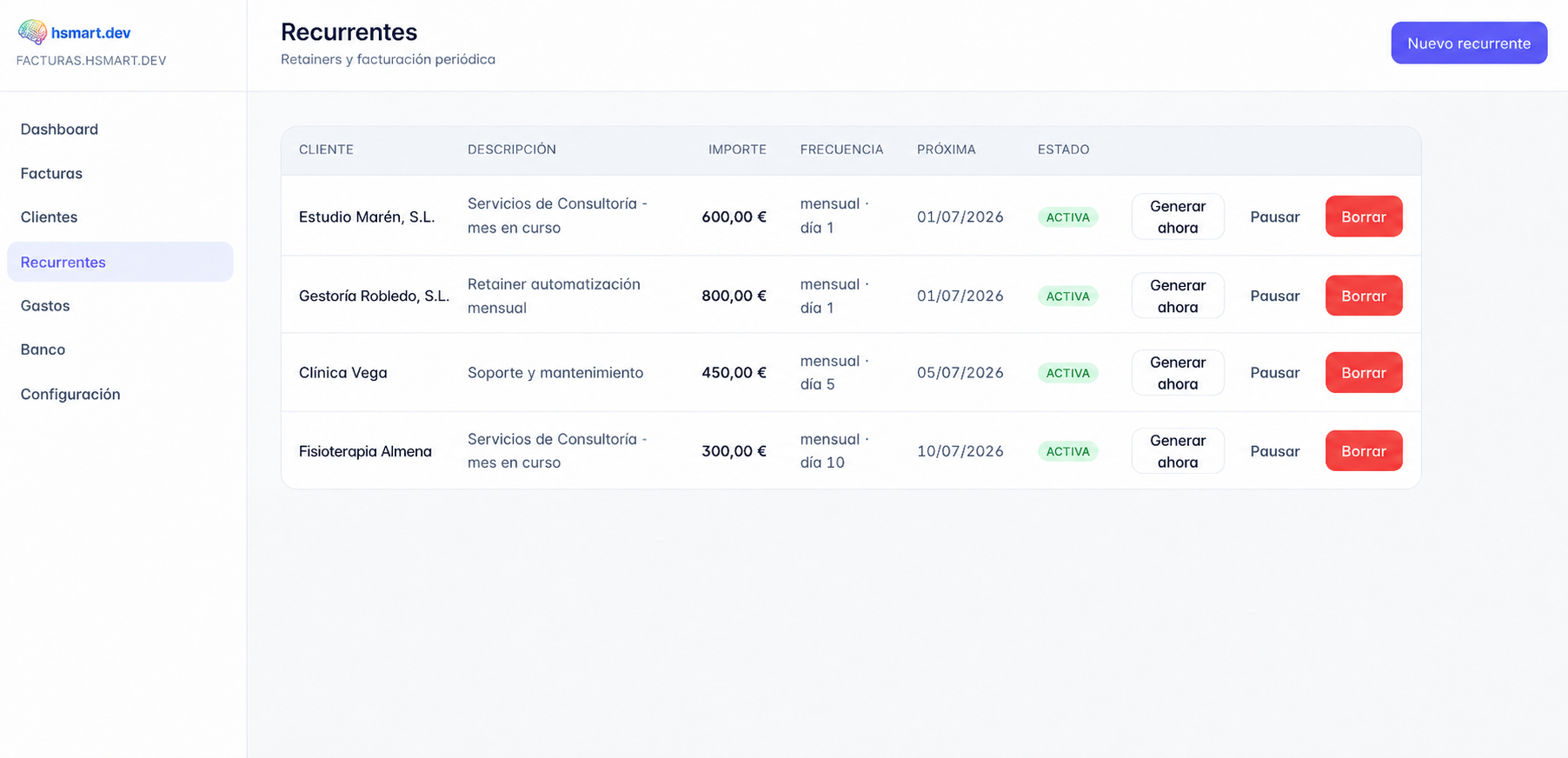 Una regla recurrente configurada una vez: genera y envía la factura el día 1 de cada mes, sin intervención mía.
Las capturas son de mi propia plataforma de facturación; los nombres de cliente y las cifras son datos de ejemplo ilustrativos, no registros reales.
2. Reclamación automática de pagos (dunning)
El segundo mayor ROI, porque recupera dinero que de otro modo darías por perdido. Cuando una factura sigue impagada pasada su fecha de vencimiento, el sistema, no tú, envía un recordatorio educado. Y uno más firme una semana después. Nunca tienes que redactar el email incómodo, porque ya está escrito y programado.
El camino más fácil es un procesador de pagos con dunning incorporado. Stripe Invoicing y herramientas similares hacen recordatorios automáticos, páginas de pago alojadas y recibos de serie. El cliente pulsa un enlace y paga con tarjeta; tú no tocas nada. Para autónomos que cobran por transferencia, una automatización que vigila las facturas «impagadas y vencidas» y dispara un recordatorio con plantilla hace el mismo trabajo.
3. Numeración y cumplimiento fiscal que no puedan descuadrarse
Esta es la parte sin glamour que te muerde en la declaración. En España (y en la mayor parte de la UE), los números de factura deben formar una serie correlativa sin huecos, y un borrador eliminado no puede dejar un hueco permanente. Cuando construí mi propia plataforma de facturación, la regla que tuve que clavar fue esta: un borrador no reserva nada; el número legal se asigna solo en el momento en que la factura se emite de verdad, anclado a la fecha de emisión para que la secuencia se mantenga monótona. Si esto lo haces mal, le has creado un problema de auditoría a tu yo del futuro.
Uses la herramienta que uses, verifica dos cosas: que los números se asignan al emitir (no al guardar el borrador) y que cada factura emitida queda registrada para tu exportación fiscal trimestral. Si tu gestor tiene que perseguirte cada trimestre por facturas que faltan, el sistema no está terminado.
4. Una única fuente de verdad sobre lo facturado
Por último, todo lo anterior debería escribir en un único lugar en el que confíes: una base de datos, una herramienta de facturación seria, incluso una hoja de cálculo disciplinada para empezar. El objetivo: poder responder en cualquier momento a «qué se ha facturado, qué se ha cobrado, qué está vencido» sin reconstruirlo desde tu bandeja de entrada. Esto es también lo que te permite entregarle a tu gestor una exportación trimestral limpia en lugar de una caja de zapatos llena de PDFs.
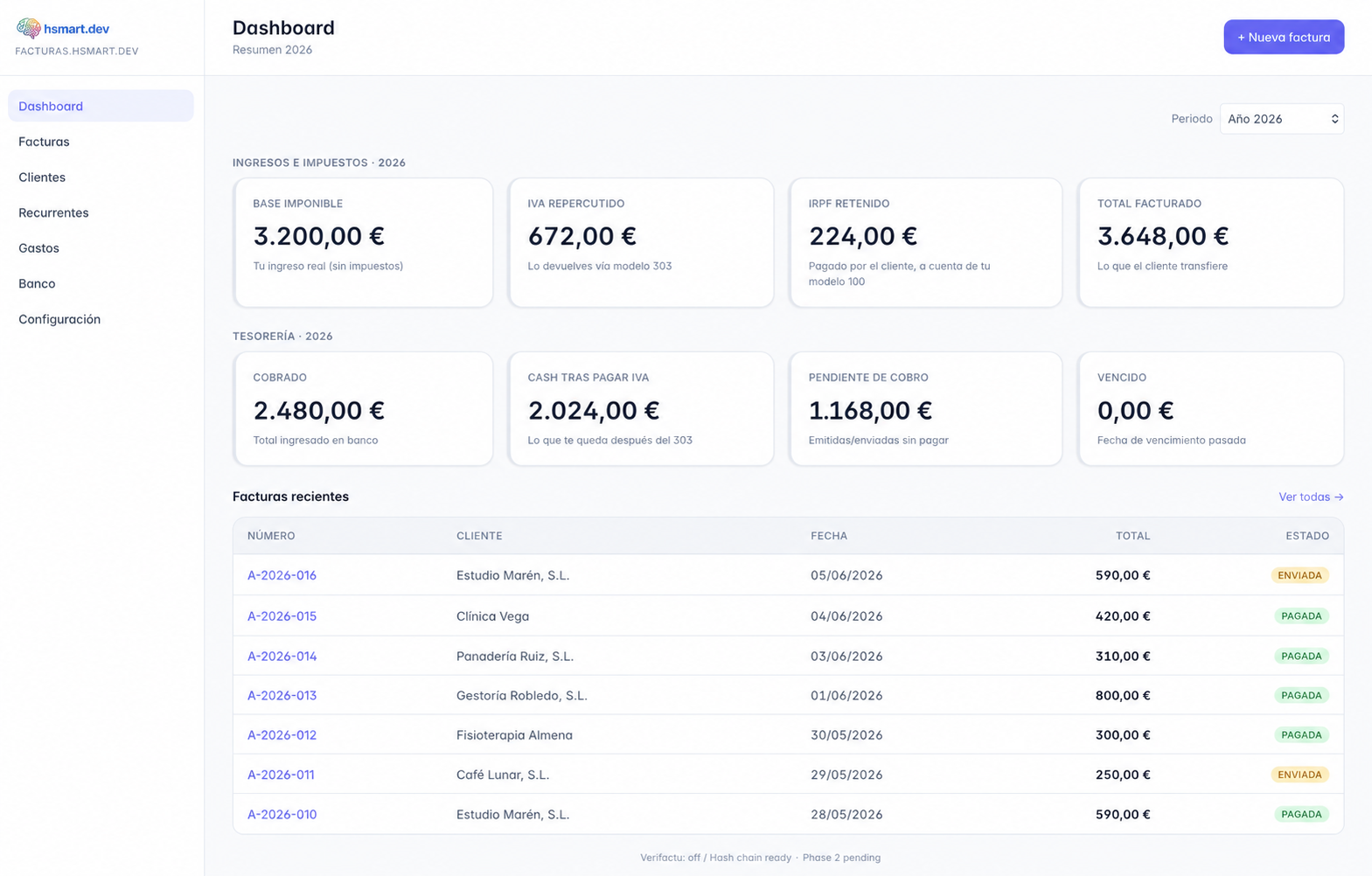 Una única fuente de verdad: facturado, cobrado, pendiente y vencido, respondible de un vistazo, no reconstruido desde el correo.
¿Construir o comprar? Sé honesto sobre cuál necesitas
No siempre necesitas un desarrollo a medida. El árbol de decisión honesto:
- Estás empezando / facturación simple: usa una herramienta hecha (Stripe Invoicing, un SaaS de facturación local o el software estándar para autónomos de tu país). No construyas. El ROI de lo hecho a medida todavía no existe.
- Ingresos recurrentes + un procesador de pagos: Stripe Subscriptions o Billing cubre facturas recurrentes y dunning y recibos en uno. Para la mayoría de los consultores este es el punto óptimo.
- Necesidades específicas de cumplimiento local, varias líneas de ingresos, o quieres conectarlo con el resto de tus operaciones: aquí es donde una capa a medida (o una plataforma de automatización que conecte tus herramientas) se gana el sueldo, con la misma lógica moldeada a tus reglas fiscales exactas y conectada a tu CRM, tus contratos y tu banco.
El error que más veo es el del autónomo que construye un sistema de facturación a medida antes de tener suficientes facturas para justificarlo, la misma trampa de construir que devora tanto tiempo al principio del freelanceo. Compra primero. Construye solo cuando la herramienta hecha de verdad no pueda hacer lo que tu negocio necesita.
Un apunte sobre ser dueño de tus datos
La facturación toca los datos de tus clientes y tus registros financieros, así que dos reglas: mantén los datos en la UE (Neon Frankfurt, herramientas con región europea) y asegúrate de que tú eres el dueño de la cuenta, las claves y la exportación. Nunca montes un sistema que atrape tu historial de facturación dentro de un proveedor del que no puedas salir. La gracia de automatizar la facturación es hacer el negocio más resiliente, no entregárselo a la plataforma de otro.
La facturación es la fuga aburrida que más cuesta en silencio. Tápala primero y recuperas dinero, horas y la pequeña dignidad de no volver a preguntarle a un cliente que te paga si ha visto tu factura.
¿Quieres saber si tu facturación está perdiendo dinero? Reserva una auditoría gratuita de 30 minutos. Cuéntame a grandes rasgos cómo facturas hoy y te diré cuál de estas cuatro piezas recuperaría más, en euros y en horas, y si te conviene comprar una herramienta o construirla. Sin discurso comercial, sin compromiso.
Lecturas relacionadas

Preguntas frecuentes
Empieza por las facturas recurrentes si parte de tus ingresos es una iguala o suscripción. Una herramienta de facturación o una pequeña automatización que genere y envíe la factura un día fijo de cada mes elimina por completo el fallo más común (olvidarte de facturar). Stripe Invoicing o Subscriptions cubre la facturación recurrente más los recordatorios de pago automáticos de serie, que es el punto de partida correcto para la mayoría de los consultores.
Compra primero. Las herramientas hechas (Stripe, el software local para autónomos) cubren a la mayoría de los freelance, y construir a medida antes de tener suficientes facturas para justificarlo es una trampa de tiempo clásica. Construye una capa a medida solo cuando tengas necesidades específicas de cumplimiento local, varias líneas de ingresos o quieras conectar la facturación con el resto de tus operaciones. Entonces sí se gana el sueldo.
Automatiza el dunning. Un procesador de pagos con recordatorios incorporados (como Stripe) envía seguimientos educados, y luego más firmes, según un calendario cuando una factura vence, así que nunca redactas tú el email incómodo. Si cobras por transferencia, una automatización que vigile las facturas «impagadas y vencidas» y dispare un recordatorio con plantilla hace el mismo trabajo y recupera dinero que de otro modo darías por perdido.
Los números de factura deben formar una serie correlativa sin interrupciones, y un borrador eliminado no puede dejar un hueco permanente. La regla segura es que el número legal se asigna solo cuando la factura se emite de verdad (anclado a la fecha de emisión), no cuando se guarda como borrador. Asegúrate también de que cada factura emitida queda registrada para tu exportación fiscal trimestral, para que tu gestor no tenga que perseguirte cada trimestre.
Para la mayoría de los autónomos, 2-4 horas al mes de pura administración, más los ingresos recuperados de facturas que antes se quedaban sin enviar o sin cobrar. Las horas por sí solas son modestas; la victoria grande suele ser el dinero que dejas de perder y la eliminación del email incómodo de reclamar pagos. Es la automatización con mayor certeza de retorno en un negocio unipersonal, y por eso es la que construyo primero.